
You can now see declined transactions in your Chime app, helping you understand why they didn’t go through and what you can do next.
Declined transactions appear in your transaction history with a “Declined” label. They will appear alongside approved ones in the Settled section of the app, ordered by authorization time and sorted by the most recent transaction.
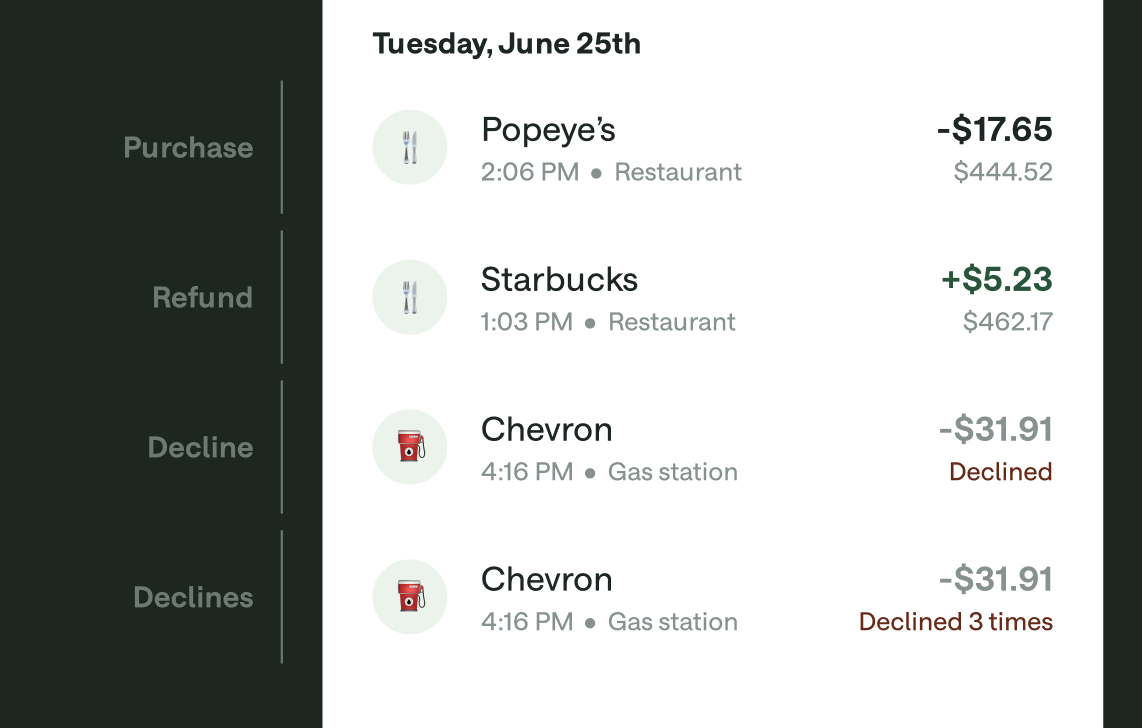
The reason the transaction was declined
The most relevant next step to fix the issue
There are several reasons why your transaction may have been declined.
Reason | Resolution |
Card isn’t active | If your card hasn’t been activated yet, transactions will decline. See How do I activate my card? |
Transactions are disabled | If you've turned off transactions in the app, purchases will not go through. |
Card is closed (lost, stolen, or expired) | If you reported your card as lost or stolen, it will be deactivated and any transactions will decline. If your card is close to expiring, we’ll send you a new one a few weeks in advance. |
Account doesn’t have enough money | To add money to your account, go to Move in the app. |
Limits are exceeded | Transactions can decline if you exceed the spending or withdrawal limit on your Checking Account, or the available-to-spend limit in your Credit Builder or Chime Card account. See What are my account limits? |
Wrong PIN | If you forgot your PIN, you can reset it by following the steps in How do I set or change my PIN? |
Incorrect CVV code | Check the three-digit code on the back of your card (next to the signature box) and try again. |
Incorrect expiration date | Make sure you’re using the expiration date from your current card. |
Incorrect billing address | If the billing address doesn’t match your Chime account, the transaction may decline. See How do I update my address? Alternatively, verify that the address you entered during checkout matches your Chime account. |
Country is blocked | Chime cards don’t work in certain countries. This can’t be changed. For more information, check Can I use my card outside of the United States? |
Issue with the merchant | The issue may be with the merchant’s system. Try a different method (swipe, chip, or manual entry) if contactless doesn’t work. |