
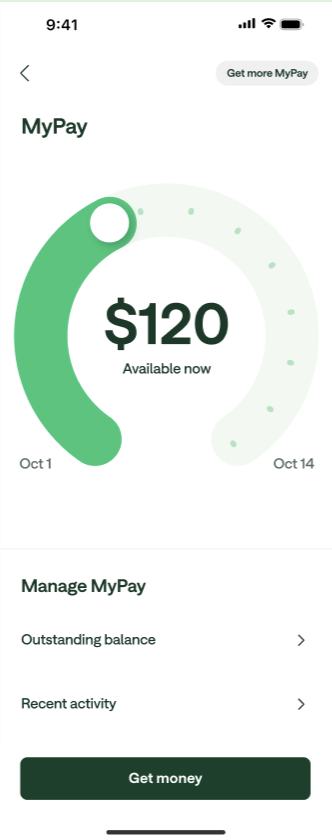
MyPay is a new way to access your pay before payday. Chime uses your direct deposit amount, history, and other factors to determine how much you can access with MyPay. During each pay period, you can see your credit limit and the “Available now” amount that you can access that day.
Most eligible members can access between $20 and $500 per pay period.
Note: Some eligible members in an experiment may qualify for temporary higher limits up to $1,000. The exact credit limit and “Available now” amount are shown in the Chime app.
Note: Some eligible members in an experiment may qualify for temporary higher limits up to $1,000. The exact credit limit and “Available now” amount are shown in the Chime app.
You can use MyPay advances to receive money within 24 hours for free or instantly for a 3% fee of the advance amount, with a built-in minimum and maximum fee amount ($2 minimum and $5 maximum) per advance. Instant advances are optional and do not impact the amount available to you.
Frequently asked questions
How do I sign up for MyPay?
If you’re eligible, you’ll receive an email and a notification in your Chime app inviting you to enroll in MyPay. Just tap the notification and follow the prompts to enroll. Refer to Am I eligible for MyPay®? for more information on eligibility requirements.
Does MyPay have any fees or interest?
- There is no interest.
- There is no mandatory, annual, or late fee for using MyPay.
- There is no cost for MyPay scheduled advances, and money will arrive in your Credit Builder or Checking account within 24 hours, after requesting an advance.
- There is an option to get funds instantly for 3% fee of the advance amount, with a built-in minimum and maximum fee amount ($2 minimum and $5 maximum) per advance. See Bancorp MyPay Agreement or Stride MyPay Agreement for details.
Will MyPay impact my credit score?
Chime does not perform a credit check when you use MyPay, and the use of MyPay will have no impact on your credit reporting or credit score.
How does accessing money with MyPay work?
You can get a MyPay advance right from the Chime mobile app, and it will be transferred directly into your Chime Checking account or Chime Credit Builder account.
For members with a Credit Builder account (not on Single Balance), the Credit Builder account is set as the default destination for MyPay advances, instead of the Chime Checking Account. You can still choose to send your advance to your Chime Checking account each time you take an advance. If your Credit Builder Account has a negative balance, your advance will be sent to your Chime Checking Account instead.
To get an advance in app, follow the instructions below:
Tap MyPay.
- Scroll to the amount you’d like to request on the MyPay dial or tap on the dollar amount in the center to enter the advance amount you’d like to request.
Tap Get Money.
Under Send to, select the account you’d like the advance to go to and tap Next.
- Tap the option for how fast you want to access it:
- You can tap the option Instantly for a 3% fee of the advance amount, with a built-in minimum and maximum fee amount ($2 minimum and $5 maximum), or
- You can tap the option Within 24 hours to access it for free
- Tap Next.
- Review the information on the screen including:
- The amount of your advance
- Your new account balance
- You must also check the authorization box confirming Chime will debit your Chime Checking Account for repayment
- Tap Confirm.
- Choose the account you would like your advance deposited to.
How do I check what the MyPay instant advance fees will be in the app?
Go to the MyPay Hub.
Tap Get My Money.
Choose the amount you’d like to advance and tap Next.
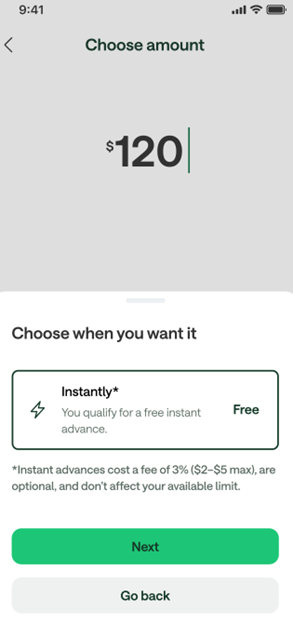
In the Choose where you want it section, look under Instant.
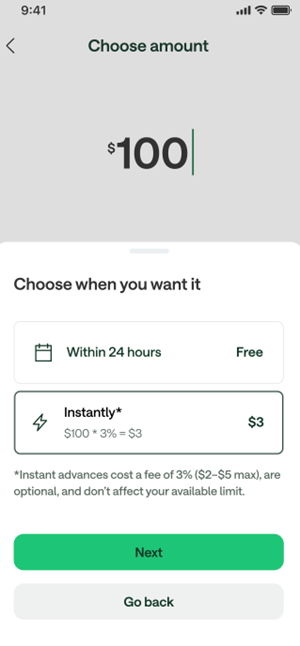
The app will automatically calculate 3% of your advance amount.
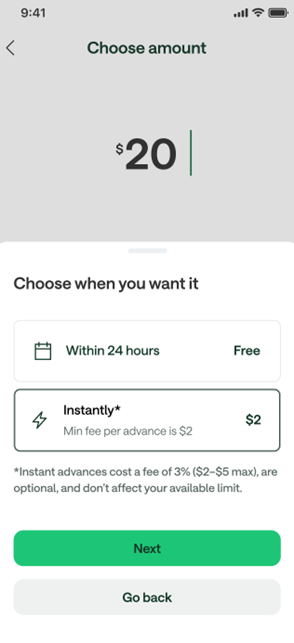
If the 3% is less than $2, your fee will show as $2.
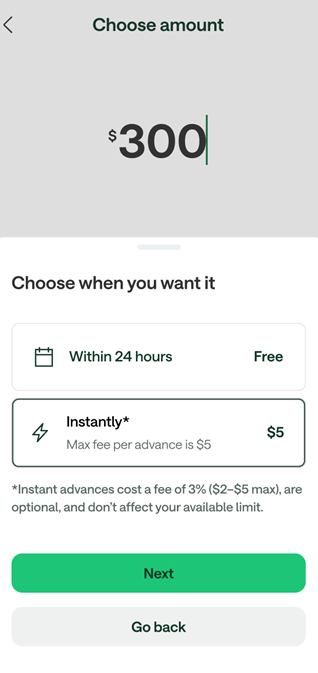
If the 3% is more than $5, your fee will show as $5.
If the 3% is between $2 and $5, you’ll see that exact amount displayed.
Some members may qualify for a free instant advance and will see “Free” instead of a fee.
| 3% Fee | Minimum Fee | Maximum Fee | Qualifies for Free advance |
 |  |  |  |
What is “Available now”?
This is the max you can get today. It may increase daily up to your credit limit as you earn money. To determine this amount, Chime looks at your primary income source, which is the qualifying direct deposit that brings the highest estimated deposit into your account.
At the beginning of your pay period (after you just received a qualifying direct deposit), it starts over at $0 and usually increases every day until you reach your credit limit. Any advances you've taken are deducted from your “Available now” amount. When your next qualifying direct deposit arrives, your “Available now” will be reset and your credit limit will be recalculated.
Why did my “Available now” amount change?
The amount of your “Available now” is determined based on your direct deposit amount, direct deposit history, and other risk-based criteria. Your “Available now” could increase or decrease based on changes to these factors. Additionally, if you recently got an advance, your “Available now” amount would decrease due to less remaining funds available.
What is the Credit limit?
When you enroll in MyPay you’re given a credit limit, which typically starts between $20 to $100. This is the maximum amount you can access in a pay period, and is recalculated every time you get a direct deposit. Your credit limit is determined by your direct deposit activity, bank account activity, risk-based criteria, and whether or not you’ve shared information about your work.
What states is MyPay available in?
Currently MyPay is available to eligible members in the following states:
- Alabama, Alaska, Arkansas, Arizona, California, Delaware, District of Columbia, Florida, Georgia, Hawaii, Idaho, Iowa, Indiana, Kansas, Kentucky, Louisiana, Maryland (Chime Depositors only), Michigan, Mississippi, Missouri, North Carolina, North Dakota, Nebraska, Nevada, New Hampshire, New York (Chime Depositors only), Ohio, Oklahoma, Oregon, Pennsylvania, Rhode Island, South Carolina, Tennessee, Texas, Utah, Vermont, Virginia, West Virginia, Wisconsin, and Hawaii.
You must live in a state where MyPay is offered and continue to live in that state in order to use MyPay. If you move to a state where MyPay is not offered, you will not be able to use MyPay. If you change your address, please update your address by calling 1-844-244-6363.
MyPay® line of credit provided by The Bancorp Bank, N.A. or Stride Bank, N.A. MyPay services provided by Chime Capital, LLC (NMLS ID 2316451).